Every detail of your child’s care, in one calm place.
Mira is a care record for your child: medications, appointments, symptoms, therapies, meals, and the daily details that matter. It is built for parents and caregivers managing a child’s medical and daily care, including families managing complex or special-needs care.
- No ads, ever.
- Offline-first.
- Your record stays yours.
- OfflineWorks without a connection
- 0Ads, ever
- 1Record, always yours
What Mira promises
- Works offline Every screen works without an internet connection.
- Encrypted in transit Everything sent to the cloud travels over encrypted connections.
- No ads, ever No advertising, no ad tracking, no ad partners.
- Doctor-ready report Print or share a clean summary of the record.
- Android first Mira arrives on November 20, 2026.
Three screens you will actually use.
These are real screenshots from the app, filled with demo data.
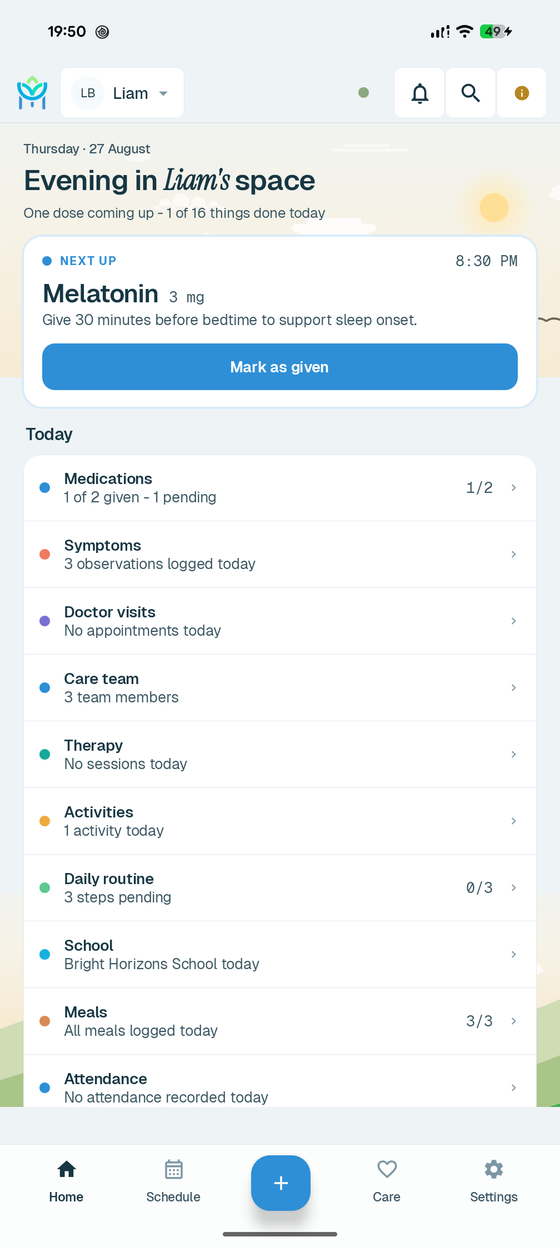
Open the app and today is already there
- Next up shows the dose that is due, at what time, and what it is for.
- One tap on Mark as given records it.
- Today lists medications, symptoms, visits, therapy, activities, school, meals and attendance - what is done, what is left.
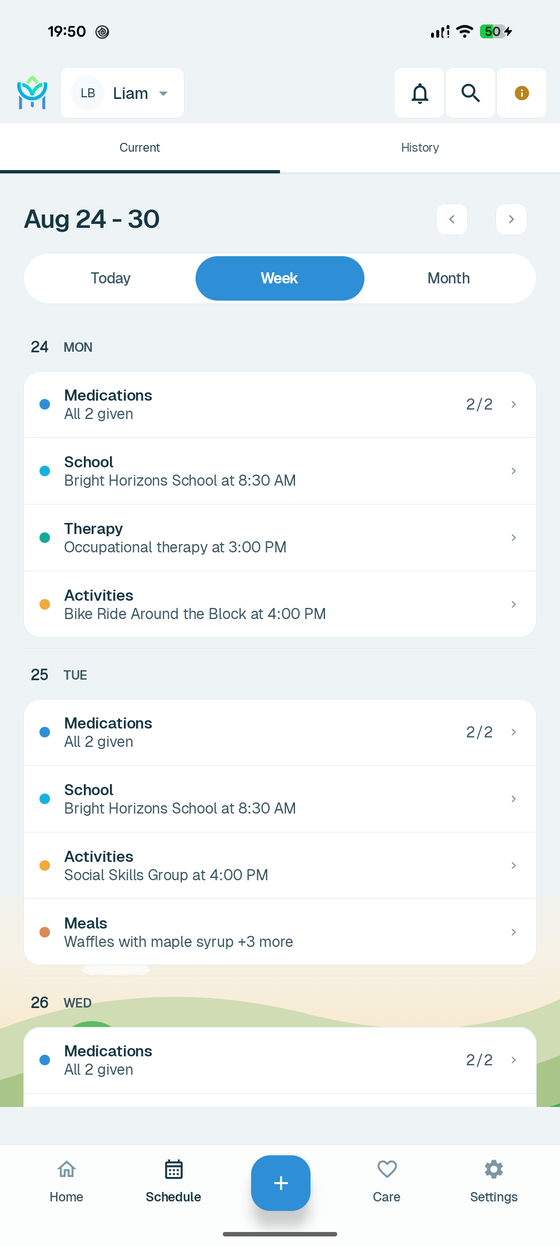
A week you can take in at a glance
- Today, Week and Month views of the same agenda.
- Each day lists what is planned and what is already done, with times.
- A History tab keeps past days without crowding this week.
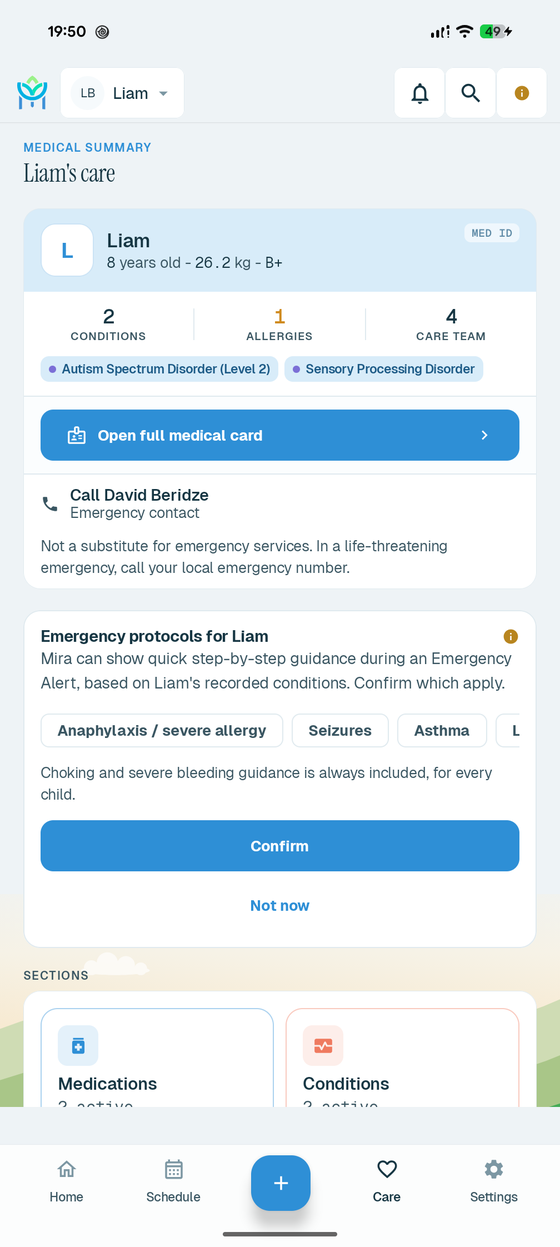
The one screen you can hand to someone else
- A medical summary at the top: age, weight, blood type, conditions, allergies, care team.
- The emergency contact and the full medical card are one tap away.
- Emergency protocols you confirm in advance, from the conditions you recorded - and the screen says plainly that this is not a substitute for emergency services.
Looking for something more specific?
Care is a team effort. Mira keeps the whole team on the same page.
A grandparent, a nanny, a co-parent: anyone you trust will be able to help keep the record up to date. You will stay in control of who sees what and who can log what.
Family sharing is available now: invite them with a code and choose their role. Here is how it works.
-
Invite
From the app, create a simple 6-character invite code and share it with the person you trust.
-
Accept
They install Mira, enter the code, and join your family with exactly the role you chose: Parent, Caregiver, or Read-only.
-
Share one care log
Everyone will see the same up-to-date record. A dose logged by the nanny at noon will be on your phone by the time you ask.
Your child’s record is nobody’s business but yours.
Mira asks you to trust it with genuinely sensitive information, so here is exactly where we stand, in plain words:
No ads, ever.
Mira has no advertising, no ad tracking, and no advertising partners. This will not change.
- Your data is never sold. Not to advertisers, not to data brokers, not to anyone, under any definition of “sold”.
- Offline-first. The record lives on your phone and works fully without an internet connection. Cloud backup and sync exist so your record survives a lost phone, and you can turn them off.
- Encrypted in transit. Everything sent between your phone and our cloud services travels over encrypted connections.
- Attachments encrypted on your device. Photos and documents you attach are encrypted at rest on your phone.
- Cloud data encrypted at rest by Google’s infrastructure. If you use sync, your data is stored on Google’s Firebase infrastructure, which encrypts stored data as standard practice. We do not claim more than that: Mira does not currently offer end-to-end encryption.
The full details, including exactly what is collected and every control you have, are in our Privacy Policy.
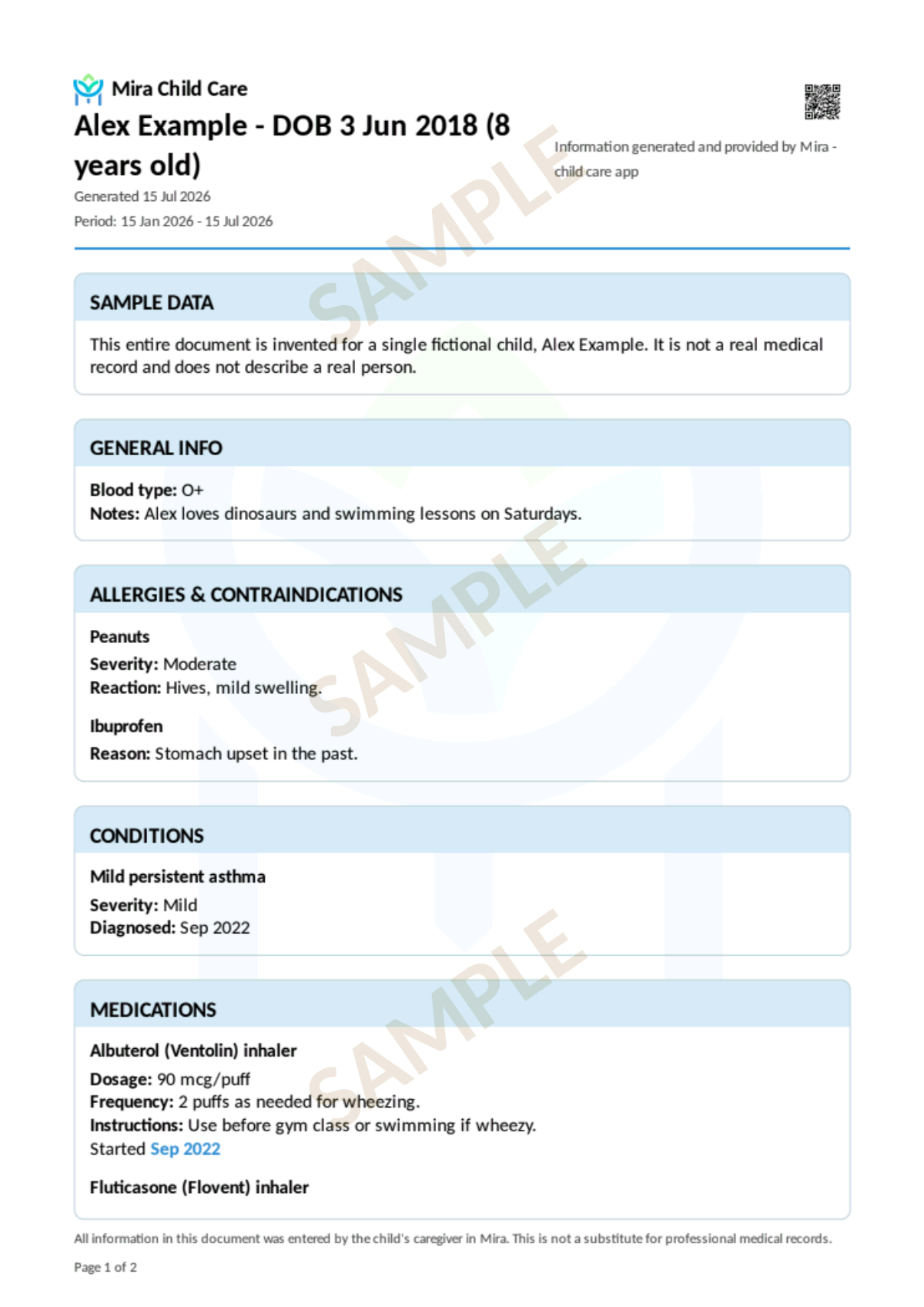
See exactly what you can hand your child's doctor.
Every Mira family can generate a doctor report right from the app - a clean, printable summary of medications, conditions, and care history. This is a real sample page, built with the exact same layout the app produces, so you can judge the quality before you ever create an account.
Every name and detail below is invented for this preview. No real child's information appears on this page, in the sample file, or anywhere on this website.
Download the sample PDFYour own report will reflect whatever you've recorded for your child - this sample shows the format and quality, not a preview of your content.
Started by one father. Now run as a real company.
Mira started the way most caregiving does: with too much to remember. Doses and times, reactions to watch, questions for the next appointment, therapy schedules - scattered across a notebook, a chat thread, and a tired parent's memory.
When a child needs complex care, those details are not small. Getting a dose right, noticing a pattern early, walking into a doctor's office with the whole story - that is what a good record changes. Nothing out there treated a family's day-to-day care with the seriousness it deserves, so Mira was built at home, for one child, first - by a father living that same care every day. It is still one person's work, with advice along the way from medical professionals, software engineers, doctors and psychologists - and it is now operated by a registered company, MIRA CARE LINK LLC.
That origin still decides how it works. It shows no ads, because it was never built to sell your attention. It works offline, because care does not wait for good wifi. And the record belongs to your family - to share with the people you trust, and no one else.
George parent, and the person who started Mira
Get Mira Child Care
Mira is getting ready to launch on Android. Join the waitlist and we will tell you the day it is live.
Questions parents ask us
Is Mira free?
Mira is free when it launches: nothing is locked, nothing expires, and you will not be asked for a card. We are building Mira as a paid app in the long run, because a subscription is the only honest way to pay for something that will never show you an ad or sell your family’s data.
When paid plans do arrive, we will publish exactly what they cost on this page before anything changes, and no existing account will be charged without being asked first.
Does Mira work offline?
Yes, fully. Mira is built offline-first: the record lives on your phone, and every screen works without an internet connection. A connection is only used for optional extras like cloud backup, sync between devices, and family sharing.
Can I share access with a nanny or grandparent?
Yes. Invite them with a simple code and choose their role: a Parent with full access, a Caregiver who can log daily care or a Read-only member who can see the record but not change it. You can remove anyone at any time.
Is my child’s data safe?
We treat it as the most sensitive data there is. No ads, no selling of data, encrypted connections, and cloud data encrypted at rest by Google’s infrastructure. Your child’s record is visible to your account and to nobody else who uses Mira. We can reach your data ourselves to run, secure and repair the service - for example to fix a sync problem - and we would rather tell you that plainly than promise you something that is not true.
The complete picture is in our Privacy Policy.
Does Mira give medical advice?
No. Mira is a record-keeping tool, not a medical device. It stores and organizes the information you enter, but it does not diagnose, interpret, or advise. Always confirm medication doses, care instructions, and any health decision with a qualified medical professional, and never rely on Mira alone in an emergency.
How do I delete my data or my account?
Any time, in the app: open Mira and go to Settings, then Profile & Account, then choose “Delete account”. You can also sign in on this website and delete your account there, or email us and we will handle it for you.
Step-by-step instructions are on the account deletion page.
Don't need the full app right now? Try the free, no-signup printable handoff sheet instead - perfect for a one-off babysitter or grandparent visit.
Talk to a human
- Questions, problems, or ideas support@mirachildcare.com
- Privacy questions and data requests privacy@mirachildcare.com